Table of Contents
我在之前的文章1提到,可以通过软链接的方式将不同的 roam directory 合并在一起使用, 平时在不同的主题下工作,到了最后也可以将所有的仓库都形式上合并,整体上看来就像是分布式的 roam 仓库一样。 虽然早就有这个想法,但在最近才尝试成功:之前即使创建软链接,也无法做到所有的 roam 结点都装载到一个数据库中。 也是经过自己的一番尝试,才找到问题的最终原因。
Manifest
疑问来自于在将 sub-roam 目录映射到 main roam 内的软链接后,使用 M-x org-roam-db-clear-all 先清除原来的 roam database 数据,利用 M-x org-roam-db-sync 重新建立起数据库,再执行 M-x org-roam-node-find 后无法找到 sub-roam 的结点。
整个过程并没有什么报错,仅是找不到结点,这点也给排查带来些麻烦。
Debug
可以定位在 org-roam-db-sync 并没有按照自己预想的工作,于是使用 edebug 单步调试 org-roam-db-sync 中的栈变量,找到了 org-roam-files 并没有包含 sub-roam 的 .org 文件。
同时这个值来自于 org-roam-list-files ,里面使用到 org-roam-list-files-commands 的命令组出一个命令去搜索所有的符合要求的 .org 文件作为 roam database 的来源:
(defun org-roam--list-files (dir)
  "Return all Org-roam files located recursively within DIR.
Use external shell commands if defined in `org-roam-list-files-commands'."
  (let (path exe)
    (cl-dolist (cmd org-roam-list-files-commands)
      (pcase cmd
        (`(,e . ,path)
         (setq path (executable-find path)
               exe  (symbol-name e)))
        ((pred symbolp)
         (setq path (executable-find (symbol-name cmd))
               exe (symbol-name cmd)))
        (wrong-type
         (signal 'wrong-type-argument
                 `((consp symbolp)
                   ,wrong-type))))
      (when path (cl-return)))
    (if-let* ((files (when path
                       (let ((fn (intern (concat "org-roam--list-files-" exe))))
                         (unless (fboundp fn) (user-error "%s is not an implemented search method" fn))
                         (funcall fn path (format "\"%s\"" dir)))))
              (files (seq-filter #'org-roam-file-p files))
              (files (mapcar #'expand-file-name files))) ; canonicalize names
        files
      (org-roam--list-files-elisp dir))))
最终在 org-roam--list-files-fd 函数里执行整条命令来搜索所有的文件:
(defun org-roam--list-files-fd (executable dir)
  "Return all Org-roam files under DIR, using \"fd\", provided as EXECUTABLE."
  (let* ((globs (org-roam--list-files-search-globs org-roam-file-extensions))
         (extensions (string-join (mapcar (lambda (glob) (concat "-e " (substring glob 2 -1))) globs) " "))
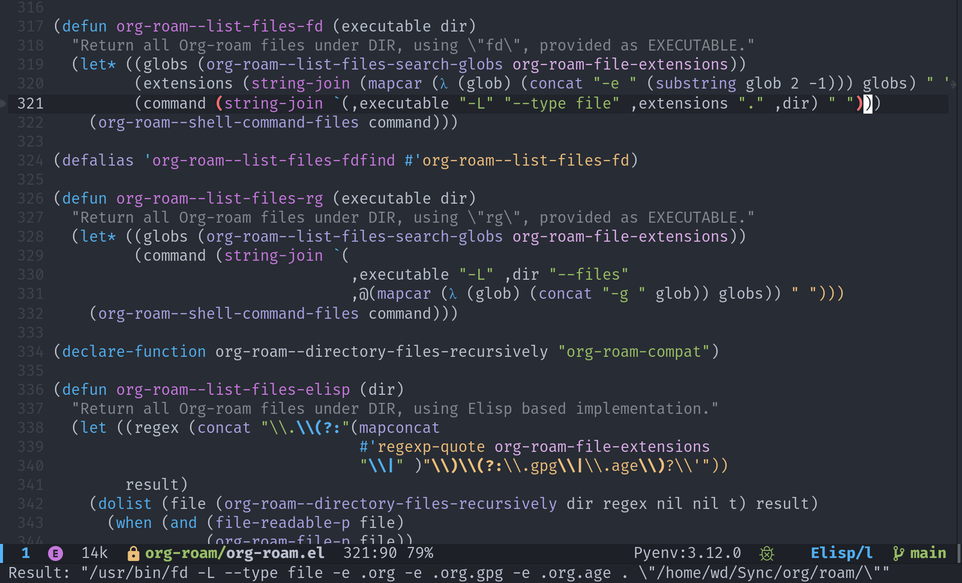
         (command (string-join `(,executable "-L" "--type file" ,extensions "." ,dir) " ")))
    (org-roam--shell-command-files command)))
Find files with command
通过 edebug 查看局部变量 command 的值,确定命令原型:
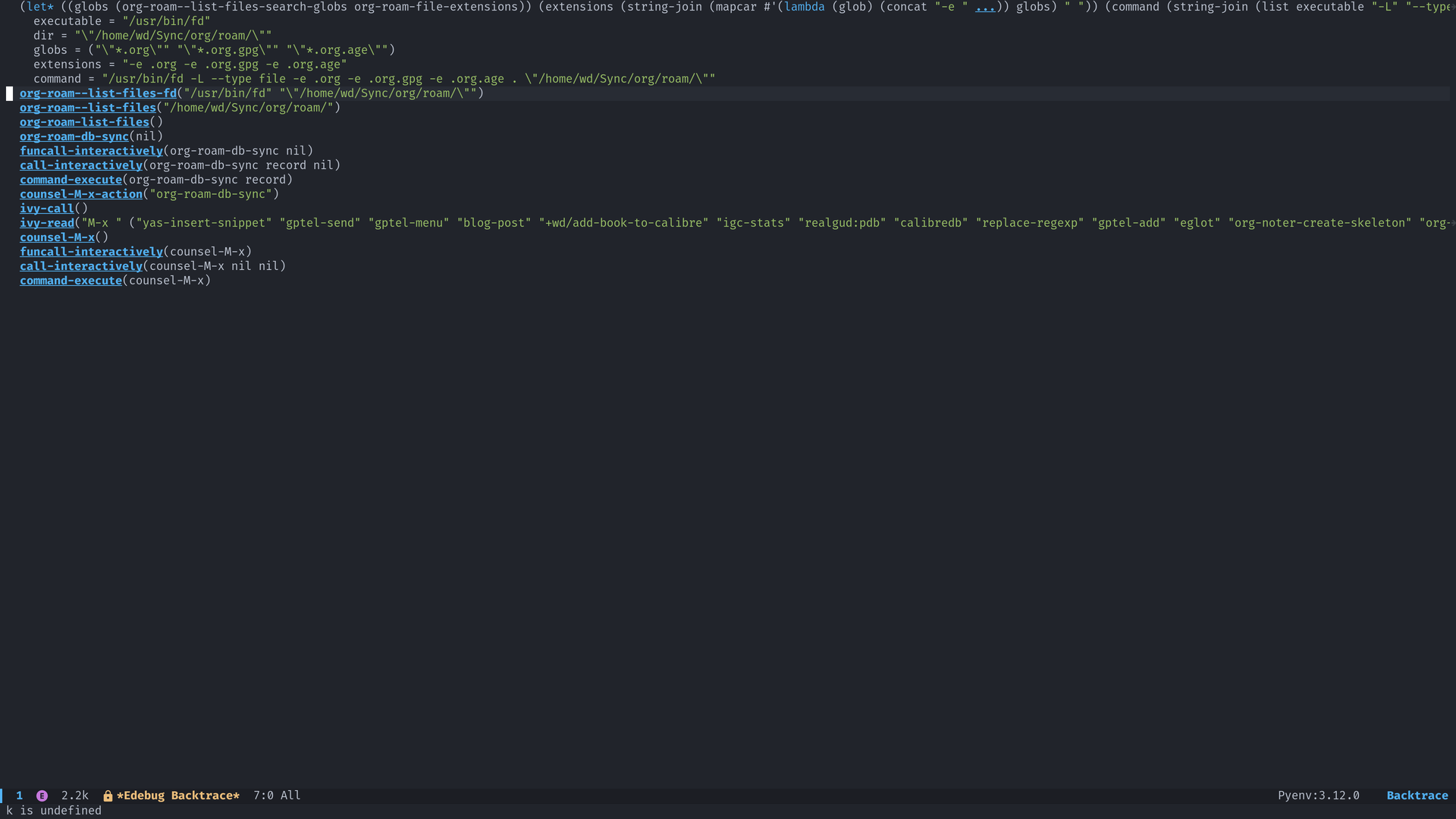
这里有一个小技巧:在 edebug 模式下使用 M-x edebug-pop-to-backtrace 查看栈,可以方便地获取栈内变量值:
Recur and test
之前写到解决问题的思路如同「最小成本的复现」2,找到这个命令也如同层层抽丝剥茧,最终找到可以复现的最小子集:
/usr/bin/fd -L --type file -e .org -e .org.gpg -e .org.age . "/home/wd/Sync/org/roam/"这个命令执行结果中确实不包含 sub-roam 里面的 .org 文件,所以在后续 M-x org-roam-find-node 时才找不到 sub-roam 的结点。
Why
在 man fd 中找到了一段描述,在不使用 -I 选项时,会忽略掉 .gitignore 中标记的文件。
-I, –no-ignore Show search results from files and directories that would otherwise be ignored by
• .gitignore
• .git/info/exclude
• The global gitignore configuration (by default $HOME/.config/git/ignore)
• .ignore
• .fdignore
• The global fd ignore file (usually $HOME/.config/fd/ignore )
The flag can be overridden with ’–ignore’.
事实上我有两台电脑会同步所有 org-roam 文件,一开始是想要在两台电脑上一台可以处理所有的 roam 文件,一台就不处理。所以在 .gitignore 中包含了 sub-roam 软链接,且在仓库间同步该 .gitignore 文件。
最终影响了 org-roam-db-sync 找到 sub-roam 目录内的 .org 文件。修复即将 .gitignore 中的 sub-roam 软链接放到 syncthing 的 .stignore 配置中忽略同步,来最终实现在不同的机器上使用不同目录的 roam :一台机器可以在 main roam 中包含 sub-roam 目录,另一台则不包含。
Footnotes
1 https://melt.autove.dev/2024/09/28/how-to-use-a-seperate-org-roam-directory/
2 https://melt.autove.dev/2025/06/02/update-config-files-with-dotdrop/